
Managing permissions in SharePoint is one of the most complex yet crucial aspects of maintaining a secure, efficient, and collaborative environment. Without a clear strategy, organisations risk over-permissioning, security breaches, and inefficiencies that slow down productivity.
This post explores a real-world use case—how a mid-sized legal firm structured its SharePoint permissions to balance security, compliance, and collaboration.
This post is part of a new series on SharePoint use cases, showcasing practical solutions to common challenges.
The Challenge: Securing Legal Documents Without Hindering Collaboration
A mid-sized legal firm, handling confidential client cases, adopted SharePoint to streamline document management across departments. However, they faced three key challenges:
- Balancing security and accessibility – Legal documents needed to be highly secure, but teams also required access for collaborative casework.
- Simplifying permissions management – Without a structured approach, permissions were quickly becoming unmanageable.
- Minimising risks of accidental access – Breaking inheritance at every level was causing inconsistent permissions and confusion for administrators.
The SharePoint Structure: Organising Legal Documents by Function
The firm structured its SharePoint environment to reflect its departmental and case-based workflows:
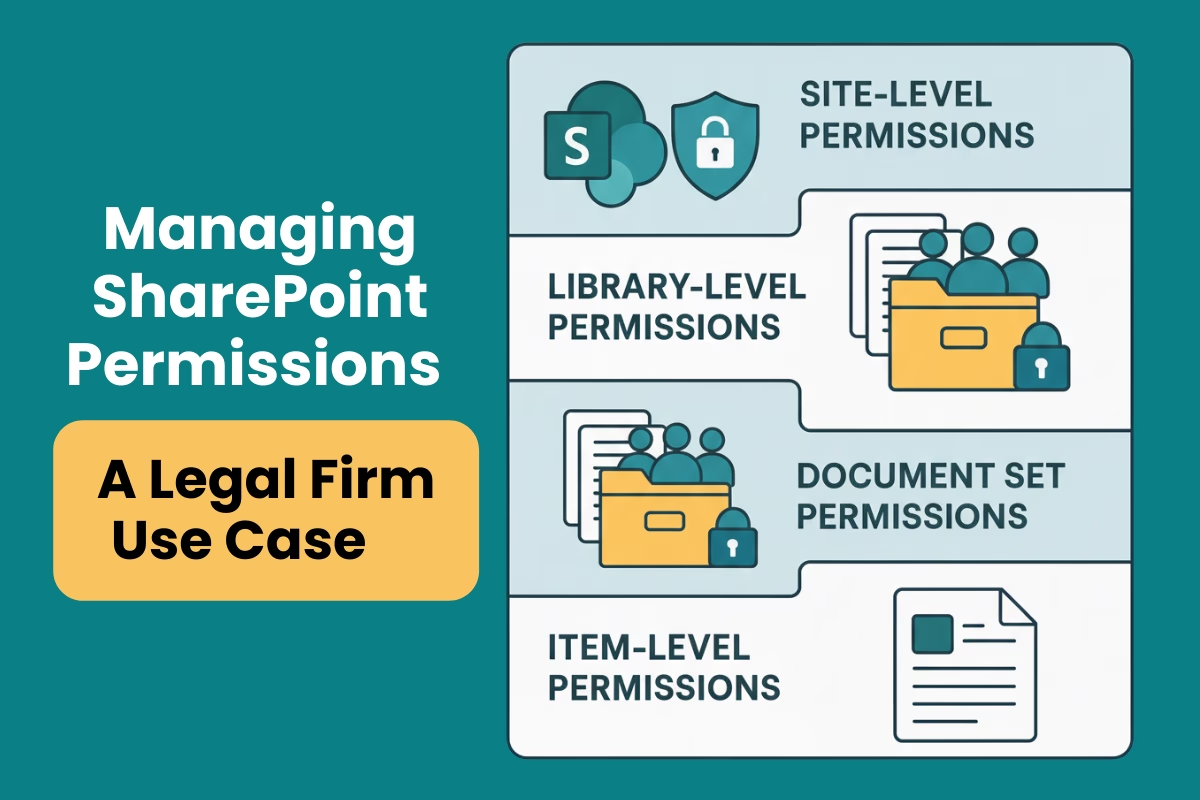
- SharePoint Site – The firm’s main document management hub.
- Document Libraries – Each department (Litigation, Conveyancing, Family Law) had a dedicated library.
- Document Sets – Each case was stored in a document set, grouping related documents together.
- Individual Documents – Sensitive files, such as contracts and court filings, were stored within document sets.
This structure allowed them to apply permissions at multiple levels for controlled access without unnecessary complexity.
The Solution: A Structured Permissions Strategy
The legal firm adopted a layered approach to SharePoint permissions, ensuring the right people had the right access at the right level.
1. Site-Level Permissions: Establishing Strong Oversight
Objective: Control access to the overall SharePoint environment and prevent unauthorised site-wide access.
- Managing partners and IT were granted Full Control to manage site settings.
- Department heads received Edit access to oversee their teams’ libraries.
- External users were restricted from accessing the site entirely for maximum security.
Outcome: Centralised control prevented unauthorised access to the entire SharePoint site, reducing security risks.
2. Library-Level Permissions: Department-Specific Access
Objective: Ensure departments only had access to their own documents while maintaining structured collaboration.
- Custom SharePoint groups were created for each department:
- Litigation – Full Control for the department head, Contribute for team members.
- Conveyancing – Edit for the leader, Read for team members.
- Family Law – Custom permissions based on case sensitivity.
- Inheritance was broken at the library level to ensure that each department’s library was only accessible to the relevant team.
Outcome: Departments could work on their cases without the risk of unauthorised access to other teams’ sensitive files.
3. Document Set Permissions: Securing High-Profile Cases
Objective: Apply additional security controls for high-profile cases that required restricted access.
- Most document sets inherited permissions from their parent libraries.
- For high-profile cases, inheritance was broken to allow access only to:
- The lead lawyer handling the case.
- Select team members directly involved in the case.
Outcome: The firm protected highly sensitive cases without overcomplicating permissions across all document sets.
4. Item-Level Permissions: Protecting Critical Documents
Objective: Secure individual files that required strict access control.
- Specific files, such as settlement agreements and privileged legal advice, were assigned unique permissions:
- Read access was limited to senior partners and relevant legal staff.
- Edit access was only granted to case managers and key contributors.
Outcome: Highly sensitive documents remained protected, ensuring compliance and preventing accidental access.
Key Takeaways: Best Practices for SharePoint Permissions
Keep in mind the following best practices when structuring your SharePoint permissions:
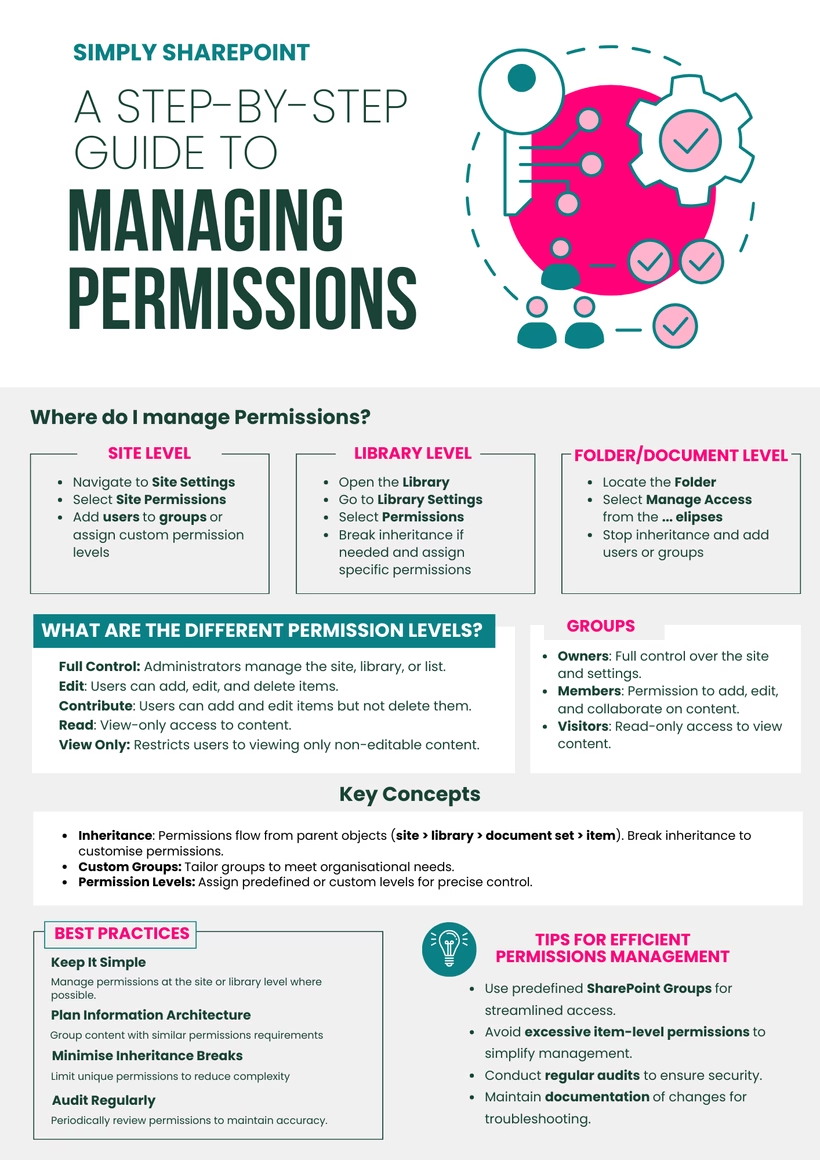
- Use inheritance wisely – Breaking inheritance too often leads to permission chaos. Only break it when absolutely necessary, such as for high-profile cases.
- Keep permissions simple – Assign permissions at the highest logical level (site or library) to avoid complexity.
- Group users for efficiency – SharePoint Groups make permission management easier than assigning access to individuals.
- Review permissions regularly – Conduct audits to check for unauthorised access and remove inactive users.
- Train your team – Educate staff on best practices to prevent mismanagement and unintentional permission changes.
Final Thoughts: SharePoint Permissions Don’t Have to Be Overwhelming
With strategic planning and the right structure, managing permissions in SharePoint becomes much more manageable and effective. This real-world legal firm example demonstrates how permissions can be used to enhance security and collaboration without unnecessary complexity.
Ready to make SharePoint simpler?
Explore the Simply SharePoint Hub
If this post helped you untangle part of SharePoint, you’ll find more practical guides, templates, toolkits and resources inside the Simply SharePoint Hub. It’s where I keep the downloads and support materials designed to help you clean up, structure and actually use SharePoint with more confidence.
Visit the Simply SharePoint Hub →

Hi, I’m Liza 👋
Microsoft MVP (SharePoint) • Information Architecture Specialist
I’ve been working with SharePoint for nearly two decades, across consulting and in-house roles, helping organisations design, clean up, and scale their Microsoft 365 environments.
My focus is information architecture — the layer that determines whether search works, governance sticks, and tools like Copilot actually deliver value… or quietly make things worse.
Through Simply SharePoint, I share practical, real-world guidance on structuring libraries, designing metadata, managing permissions, and fixing the issues that policies and “best practice” slides never really solve.
Everything here is based on how SharePoint is actually used — not how we wish it was used — with a strong emphasis on foundations that scale and hold up in the AI era.
