
How to Implement SharePoint the Right Way — Before It Becomes a Mess
SharePoint has a bad reputation in a lot of organisations. Not because it’s a bad platform — it isn’t. It’s because it got switched on without a plan. Someone set up a few sites, a few hundred folders appeared, nobody could find anything, and then someone in IT spent three years trying to fix what should have been sorted out on day one.
I’ve been working with SharePoint for 25 years. I’ve seen implementations go brilliantly and I’ve seen them fall apart. The difference almost always comes down to what happens before anyone touches a site. This post is about getting that part right.
Start with the Problem, Not the Platform
The first question most organisations ask when they’re rolling out SharePoint is: “Where do we put things?” That’s the wrong question. The right question is: “What are we actually trying to fix?”
Are you replacing messy network drives? Trying to build a company intranet? Improving how teams collaborate on documents? Automating a clunky approval process? SharePoint can do all of these things — but it does them better when you’ve decided which one you’re focusing on first.
Before anything else, get clear on the business problem you’re solving. Then get someone senior to sponsor it. A SharePoint rollout without executive buy-in is just a project waiting to stall.
The implementations that work best are the ones where someone in leadership has said, “This matters, and we’re doing it properly.” Without that, it becomes an IT project that everyone ignores until they’re forced to use it.
Do Not Try to Do Everything at Once
This is the mistake I see most often. Organisations want to migrate all their file shares, build an intranet, set up Teams channels, and automate their HR processes — all at once, all in the first quarter.
It doesn’t work. It overwhelms the people managing it, it overwhelms the people using it, and when things go wrong (and something always goes wrong), there’s no way to tell which part of the project caused the problem.
Pick one thing. Get it right. Then move on.
A sensible phased approach might look something like this:
Migrate your file shares to SharePoint. Set up document libraries with proper structure. Get people saving files in the right place. This is the foundation everything else builds on.
Once document management is working, build a company intranet or hub. This is a great way to show people what SharePoint can actually do — and it’s usually a quick win in terms of visible impact.
Once people are comfortable in SharePoint, start layering in Power Automate flows, approval processes, and anything else that makes their day-to-day work easier.
Review what’s working, tighten up permissions, implement retention policies, and make sure the platform is growing in a controlled way.
Sort Out Your Information Architecture Before You Build Anything
Information architecture sounds like a very technical term. It isn’t really. It just means: how are you going to organise things so that people can find them?
In SharePoint, this means deciding your site structure, how many sites you need, what they’re for, how they relate to each other, and what goes where. Get this wrong and you end up with site sprawl — dozens of orphaned sites that nobody manages and everyone avoids.
A few things I’d recommend getting right from the start:
- Use hub sites to connect related content. Rather than having lots of unconnected team sites, use hub sites to group them logically. A Finance hub, for example, might include sites for Accounts, Payroll, and Procurement.
- Limit who can create sites. If anyone in the organisation can spin up a new SharePoint site, they will. Then you’ll have 200 sites and no idea what any of them contain. Restrict site creation to a small group and have a clear process for requesting new sites.
- Plan your navigation early. Navigation that makes sense to the IT team often makes no sense to anyone else. Involve actual users in deciding how content is structured and labelled.
- Use metadata rather than folders. Folders feel intuitive, but they make search difficult and limit your ability to filter and organise content. Metadata — basically, tags and labels on your documents — gives you far more flexibility.
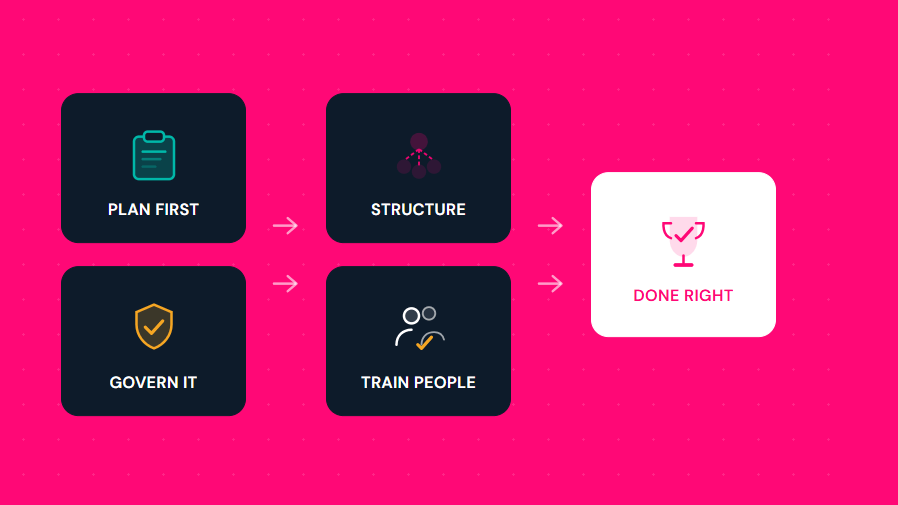
Before you set up a single site, draw your structure on paper or in a whiteboard tool. If it doesn’t make sense drawn out, it won’t make sense in SharePoint.
Governance Is Not Optional — But It Doesn’t Have to Be Complicated
Governance is one of those words that makes people’s eyes glaze over. What it actually means in practice is: who decides what, who owns what, and what are the rules for how SharePoint is used?
You don’t need a 40-page governance document. You need clear answers to a handful of important questions:
- Who can create new sites, and how do they request them?
- Who owns each site, and what are they responsible for?
- What’s the naming convention for sites, libraries, and files?
- Who has access to what, and how is that reviewed?
- What happens to a site or content that’s no longer needed?
Get these decisions made upfront, write them down, and share them with anyone who’s going to be managing SharePoint in your organisation. Revisit them at least once a year, because SharePoint — and how your organisation uses it — will change.
Site sprawl is a real problem. Because SharePoint makes it easy to create new sites, they multiply quickly. Microsoft now includes inactive site policies in SharePoint that can automatically flag or archive sites with no activity. Use them — or at minimum, assign someone to review your site inventory every quarter.
Permissions: Keep Them Simple
Permissions management is where a lot of SharePoint environments unravel. The more complex your permissions structure, the harder it is to manage, the more likely something will be shared with the wrong person, and the harder it becomes for people to find what they need.
My rule of thumb: keep permissions as simple as possible for as long as possible.
- Use SharePoint’s inheritance model. Content inherits permissions from the site or library above it. Only break inheritance when you genuinely need to restrict access.
- Manage permissions through groups, not individual users. Add people to a group, and the group has access. This is far easier to manage than granting access to individual people one at a time.
- Review permissions regularly. People leave teams, change roles, and move on. Permissions should reflect current reality, not the structure you had two years ago.
Training Is Not a Nice-to-Have
SharePoint is not like Dropbox. It’s not like Windows Explorer. It has its own logic, its own quirks, and its own ways of doing things. People who are dropped into it without any guidance will do what humans always do when faced with an unfamiliar system: they’ll find workarounds, complain that it doesn’t work, and quietly go back to emailing files around.
Training is one of the highest-return investments you can make in a SharePoint rollout. Not a one-hour video that gets ignored, but real, practical training that shows people how to do the things they need to do in their day-to-day work.
Think about your different audiences, too. A document library power user needs to know different things from someone who just needs to find and read the monthly newsletter. Tailor the training accordingly.
Identify a handful of enthusiastic early adopters across the business — people who are willing to learn and then help their colleagues. These internal champions are worth their weight in gold when it comes to driving adoption without it feeling like a top-down IT mandate.
Think About Teams and OneDrive Too
SharePoint doesn’t live in isolation any more. When someone stores a file in a Teams channel, that file is sitting in SharePoint. When someone saves something to OneDrive for Business, that’s also connected to SharePoint. When you build Power Automate flows or use SharePoint Lists — all of it is part of the same ecosystem.
This is a good thing, but it means your implementation planning needs to account for the whole picture. You don’t want to build a beautiful SharePoint document library structure only to discover that half the business is saving everything in Teams channels and the two systems are completely disconnected.
Before you go live, think about:
- How Teams channels and SharePoint document libraries will work together
- What your policy is on OneDrive for Business — when should people save there versus in a shared site?
- Whether you want users to access SharePoint through the browser, through Windows Explorer via OneDrive Sync, or through Teams
There’s no single right answer — but there needs to be a consistent approach that people are taught and expected to follow.
Make Your First Phase a Win
Whatever you decide to tackle first, make it something that’s genuinely useful to real people and visible enough that others can see it working. First impressions shape how people feel about SharePoint for a long time. A badly executed launch that leaves users confused is hard to come back from.
For most organisations, I’d suggest starting with either document management (migrating file shares to SharePoint) or a clean, well-designed intranet. Both are manageable in scope, both have a clear purpose, and both show people what SharePoint can actually do when it’s done properly.
The Bigger Picture
A successful SharePoint implementation is not a one-time IT project. It’s the start of an ongoing relationship between your organisation and the platform. Things will change — your team structure, your processes, Microsoft’s feature releases, your governance decisions. The organisations that get the most out of SharePoint are the ones that treat it as something that needs regular attention, not something that gets set up and forgotten.
Get the foundations right, go at a pace your organisation can actually manage, and invest in helping people understand and use the platform properly. Do that, and SharePoint will serve you well for years.
Skip those steps, and you’ll be the story someone else is telling about how SharePoint implementations go wrong.
Want to Go Deeper on Any of This?
The Simply SharePoint resource hub at hub.simplysharepoint.com has guides, templates, and practical resources to help you implement SharePoint properly — from information architecture and governance, to training your team and managing permissions. Everything is written in plain English, no jargon, and drawn from 25 years of hands-on experience.
Explore the Resource Hub →
Hi, I’m Liza 👋
Microsoft MVP (SharePoint) • Information Architecture Specialist
I’ve been working with SharePoint for nearly two decades, across consulting and in-house roles, helping organisations design, clean up, and scale their Microsoft 365 environments.
My focus is information architecture — the layer that determines whether search works, governance sticks, and tools like Copilot actually deliver value… or quietly make things worse.
Through Simply SharePoint, I share practical, real-world guidance on structuring libraries, designing metadata, managing permissions, and fixing the issues that policies and “best practice” slides never really solve.
Everything here is based on how SharePoint is actually used — not how we wish it was used — with a strong emphasis on foundations that scale and hold up in the AI era.
